

Having your business location on Google map or on the internet is no longer an option.. It is an essential requirement for any company or business, regardless of its size or line of business.
Customers are more and more demanding. Having all your information about your business on the internet is a very good idea.
For example, people who want to know your business hours before contacting you. If you have premises or offices, where you are. If your services require a reservation. Somehow, if it is possible to request home service. And, in the case of the most distrustful users, they go on Google Map to check nearby business. In addition, they also identify reviews or opinions of your product or service. Let us help your business to be on Google call or WhatsApp here
You can do all this with Google My Business following a very simple process. Read on to find out how!
What is Google My Business?
“Google My Business” is a free tool for companies that have an online presence. It is used for small, medium and large companies to manage the information that appears in the results of Google Search and Google Maps.
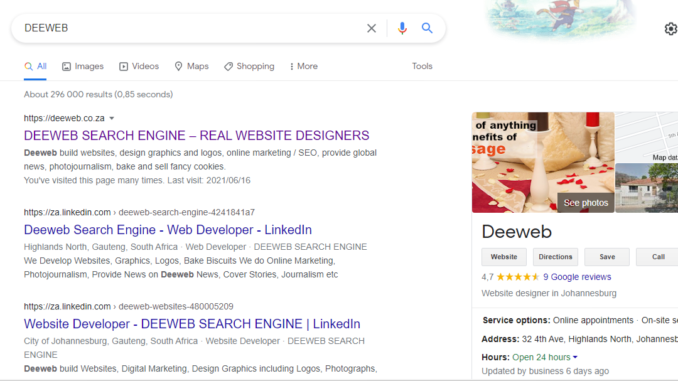
The information that appears in Google is displayed on the right of the screen (on computer or tablet). The visible data are: The name of your company, the average of the ratings assigned by users who have already interacted with the company, a brief description of the company, its address, hours, photos, its location on Google Street View, its phone number and question and answer section.
Depending on the business line of your company or business, Google may enable other data. For example, in the case of restaurants, you can enable an option to place orders at home, if it were an aesthetic you can add the direct link to make a reservation, etc.
Through your business profile, you can edit and update all your company data so that your potential customers are always up-to-date. Google my business can also show you the analytics.
Benefits of Google Map
Having your own list of online businesses, on Google Maps, makes it easy for you to contact those interested in your services. Its implementation can be part of your digital marketing strategy, thanks to its wide scope and the low cost it represents. Furthermore, users have a clear idea of your business. Not only that, they can be contacted with just one click.
Let’s not forget that you can create your profile on Google My Business for free, and you can edit the information when you need it.
So that all the benefits of having a business profile on Google are clear, let’s recap each of them:
- Having a Google My Business listing increases the organic ranking of your website because Google considers it important for UX.
- Your business has greater visibility on the web.
- If you have good reviews in the comment section, they are more likely to buy from you because it increases their confidence.
- Users can geolocate it without problem and go directly to its location.
- You can see what your competitors are doing by checking their Google My Business profiles.
- Your relationship with customers is strengthened by being able to get in touch with your company quickly.
- This tool is very easy to use, it is like creating a new account on a social network.
You get personalized, detailed and particular statistics with data called Google Analytics such as the number of visits or comments. This information can be used to improve details or correct errors. - You can integrate a virtual tour in Google Street View: Build trust and improve perception towards your business, but what is Google Street View? It is a virtual tour with the same technology that you find available on Google Maps.
Help me add my business on Google Maps?
For your business to be added on Google Maps, you have to:
- Enable and verify your profile in Google My Business (you can call now).
- The integration of your tour requires a photographic session, where a Trust Agency certified by Google, such as Deeweb will send a professional photographer to your facilities to photograph the best of your business, so prepare your best smile! !
- After the professional retouching of your photographs, your virtual tour will be integrated into Google Maps ready to be shared. You decide how and where!
How to register business on Google Maps
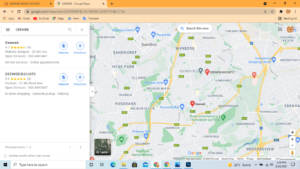
When you create your profile on Google My Business, your location will automatically be located on Google Maps. When customers click on this map, they can see how far they are from your business and how long it takes them to get there by walking, driving, or using public transportation.
Put Your Business On Map
To create your Google My Business profile, you just have to follow the following steps:
- Access Google My Business. (If you don’t have a Gmail account, you must create one.
Fill in the form, it will ask you for information such as your country where your business operates. It will also ask for the telephone, postal address, email, description of the company, photos, category that best describes your business, etc). - Check the correct location of your business on the map. When you have confirmed, click “Submit”.
- You must validate your information. The first way that Google accepts is through postal mail or email address. Within 22 days or more, they will send you a letter to the address you previously entered. In the content, there will be a PIN that you must enter in your Google My Business profile to complete the registration. (It may take several weeks to arrive, so you better be patient at this point).
- After 24 hours of registering Your PIN. Your business, will remain active on Google Maps and will appear in Google search results.
In Conclusion
Last but not list, now that you know everything, you can do, and get from having your own profile on Google My Business (and Google Maps). Wouldn’t you like to give it a try? We recommend that you start your registration today so that your letter arrives as soon as possible. Otherwise, if you have a problem with your file and its verification, contact the experts.
In conclusion, in South Africa you can find certified agencies for the services that Google distributes in the national territory (G Suite, Google Ads, Google Street View), agencies such as Deeweb, meet the requirements and have the necessary knowledge to help you. Call now or send a WhatsApp message here
Good site you’ve got here.. It’s difficult to find high-quality writing like yours nowadays.
I honestly appreciate individuals like you! Take
care!!